IT Policies and Procedures: How to Maximise Your Tech Operations

November 13, 2026

Most businesses don't decide to skip IT policies and procedures. They just never get round to writing them down. Someone sets up a shared drive one way, a new starter is told the wi-fi password over a coffee, and a "policy" ends up living in a few people's heads rather than in a document anyone can actually check. That works, until it doesn't: a leaver keeps their access for three months, two teams save the same file in different places, or nobody's quite sure what to do in the first hour of an outage.

IT guidelines exist to close that gap. Done well, they're not a compliance box to tick once and forget, they're the reason your team can onboard someone in a day instead of a week, recover from an incident instead of firefighting one, and use new tools like AI without everyone making up their own rules. This guide covers the IT policies and procedures worth having, what they actually need to include, and how to build ones your team will use rather than ignore.

IT policies vs. IT procedures: what's the difference?

The terms get used interchangeably, but they do different jobs. A policy sets the rule: what's allowed, what isn't, and why. A procedure is the step-by-step of how that rule gets carried out in practice. "Staff must use multi-factor authentication on all business accounts" is a policy. "Here's how to set up MFA on your Microsoft 365 account" is the procedure that makes it real.

Most businesses that struggle with IT guidelines have one without the other: a policy document nobody can act on, or a set of ad hoc habits with no rule behind them. Useful IT policies and procedures need both, written so a new employee could follow them without having to ask.

The core IT policies and procedures most businesses need
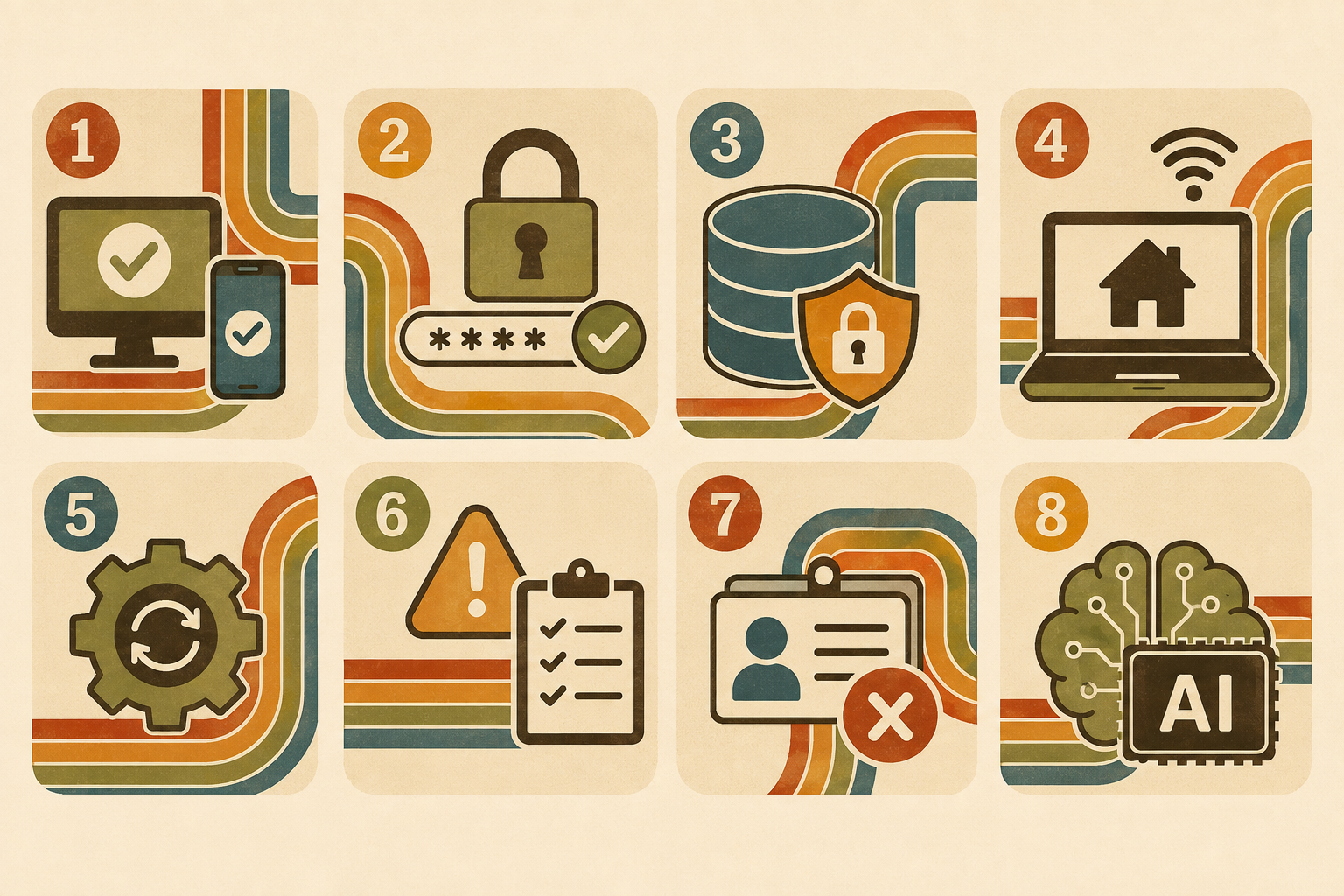
The core IT policies and procedures most businesses need. Lyon Tech

There's no single template that fits every organisation, but most businesses, regardless of size or sector, end up needing some version of the following.

  • Acceptable use policy. Covers what company devices, networks, and accounts can and can't be used for, including personal use, software installation, and social media. It's the baseline most other policies build on.
  • Password and access management policy. Sets requirements for password strength, multi-factor authentication, and how access to systems is granted, reviewed, and revoked, including when someone changes role or leaves the business.
  • Data protection and backup policy. Defines how sensitive and client data is stored, who can access it, and how it's backed up and recovered, in line with UK GDPR where personal data is involved.
  • Remote and hybrid working policy. Sets expectations for working outside the office: which devices and networks are acceptable, how personal devices (BYOD) are handled, and how data stays secure off-site.
  • Software and patch management policy. Governs what software can be installed, how updates and patches are applied, and who's responsible for keeping systems current. Unpatched software is still one of the most common ways businesses get compromised.
  • Incident response and business continuity policy. Sets out what happens when something goes wrong, whether that's a cyber incident, a system outage, or something more physical like a flood or power cut, and who's responsible for what in the first hour. If this one doesn't exist yet, our business continuity plan template is a practical starting point rather than a blank page.
  • Onboarding and offboarding procedures. Documents exactly what access a new starter needs on day one and, just as importantly, what gets switched off the day someone leaves. This is one of the most commonly skipped procedures, and one of the most exploited gaps.
  • AI use policy. The newest addition to most businesses' IT guidelines, and one many still don't have. It should cover which AI tools are approved, what data can and can't be entered into them, and how outputs get checked before they're relied on. We've put together a free AI policy template covering the legal and practical basics if you're starting from scratch.

How good IT guidelines actually maximise tech operations

It's tempting to treat IT policies as a risk-reduction exercise only, something you write to satisfy an insurer, a client's due diligence questionnaire, or an auditor. That's a real reason to have them, but it undersells what clear IT guidelines do day to day.

Written procedures mean a new hire's laptop, accounts, and permissions get set up the same way every time, not however the person doing it that week happens to remember it. A documented password and access policy means an IT review takes an afternoon instead of a forensic exercise. A clear acceptable use policy means fewer judgement calls landing on a manager's desk, because the rule is already written down. And when everyone is working from the same incident response procedure, the difference between a contained problem and a genuine crisis usually comes down to whether anyone actually knew what to do first.

None of this requires more technology. It requires the technology you already have to be governed consistently, which is exactly what IT policies and procedures are for.

Building IT policies your team will actually follow

A policy that lives in a folder nobody opens isn't much better than no policy at all. A few things tend to separate IT guidelines that get used from ones that get ignored.

Start with what's actually happening, not what should be happening.

Before writing anything, it's worth understanding your current setup: who has access to what, which devices connect to your network, where data actually lives. An infrastructure audit and gap analysis is a useful way to get that picture clearly before committing it to policy.

Write for the person who has to follow it, not the auditor who might read it.

Dense legal language gets skimmed and ignored. Plain instructions get followed.

Keep them living documents.

Technology, threats, and working patterns change fast enough that a policy written two years ago is probably already out of date somewhere. Reviewing IT guidelines annually, or whenever something significant changes (a new tool, a new way of working, a new regulation), keeps them useful rather than symbolic.

Communicate them, don't just publish them.

A policy circulated once in an onboarding pack rarely sticks. Building it into actual training, and referencing it when it's relevant, is what makes it part of how people work rather than a document they signed once.

Make ownership clear.

Every policy needs someone accountable for keeping it current and someone responsible for enforcing it day to day. Without that, even a well-written policy tends to quietly go stale.

Getting your IT guidelines in shape

If your business is operating on a mix of memory, habit, and the odd out-of-date document, you're not unusual, but it is worth fixing before a gap in your IT policies and procedures turns into an actual incident. Our professional services team works with businesses on exactly this: auditing what's actually in place, closing the gaps, and building IT guidelines that hold up in practice, not just on paper.

Want a proper look at where your IT policies and procedures stand today? Talk to Lyon Tech about an infrastructure audit, and we'll help you find the gaps before they find you.

Write to us,
we will get back to you soon

Thank you! Your submission has been received!
Oops! Something went wrong while submitting the form.

IT Policies and Procedures: How to Maximise Your Tech Operations

November 13, 2026

Clear IT guidelines cut risk and confusion. Here's what IT policies and procedures every business needs, and how to make them actually work.

Most businesses don't decide to skip IT policies and procedures. They just never get round to writing them down. Someone sets up a shared drive one way, a new starter is told the wi-fi password over a coffee, and a "policy" ends up living in a few people's heads rather than in a document anyone can actually check. That works, until it doesn't: a leaver keeps their access for three months, two teams save the same file in different places, or nobody's quite sure what to do in the first hour of an outage.

IT guidelines exist to close that gap. Done well, they're not a compliance box to tick once and forget, they're the reason your team can onboard someone in a day instead of a week, recover from an incident instead of firefighting one, and use new tools like AI without everyone making up their own rules. This guide covers the IT policies and procedures worth having, what they actually need to include, and how to build ones your team will use rather than ignore.

IT policies vs. IT procedures: what's the difference?

The terms get used interchangeably, but they do different jobs. A policy sets the rule: what's allowed, what isn't, and why. A procedure is the step-by-step of how that rule gets carried out in practice. "Staff must use multi-factor authentication on all business accounts" is a policy. "Here's how to set up MFA on your Microsoft 365 account" is the procedure that makes it real.

Most businesses that struggle with IT guidelines have one without the other: a policy document nobody can act on, or a set of ad hoc habits with no rule behind them. Useful IT policies and procedures need both, written so a new employee could follow them without having to ask.

The core IT policies and procedures most businesses need

The core IT policies and procedures most businesses need. Lyon Tech

There's no single template that fits every organisation, but most businesses, regardless of size or sector, end up needing some version of the following.

  • Acceptable use policy. Covers what company devices, networks, and accounts can and can't be used for, including personal use, software installation, and social media. It's the baseline most other policies build on.
  • Password and access management policy. Sets requirements for password strength, multi-factor authentication, and how access to systems is granted, reviewed, and revoked, including when someone changes role or leaves the business.
  • Data protection and backup policy. Defines how sensitive and client data is stored, who can access it, and how it's backed up and recovered, in line with UK GDPR where personal data is involved.
  • Remote and hybrid working policy. Sets expectations for working outside the office: which devices and networks are acceptable, how personal devices (BYOD) are handled, and how data stays secure off-site.
  • Software and patch management policy. Governs what software can be installed, how updates and patches are applied, and who's responsible for keeping systems current. Unpatched software is still one of the most common ways businesses get compromised.
  • Incident response and business continuity policy. Sets out what happens when something goes wrong, whether that's a cyber incident, a system outage, or something more physical like a flood or power cut, and who's responsible for what in the first hour. If this one doesn't exist yet, our business continuity plan template is a practical starting point rather than a blank page.
  • Onboarding and offboarding procedures. Documents exactly what access a new starter needs on day one and, just as importantly, what gets switched off the day someone leaves. This is one of the most commonly skipped procedures, and one of the most exploited gaps.
  • AI use policy. The newest addition to most businesses' IT guidelines, and one many still don't have. It should cover which AI tools are approved, what data can and can't be entered into them, and how outputs get checked before they're relied on. We've put together a free AI policy template covering the legal and practical basics if you're starting from scratch.

How good IT guidelines actually maximise tech operations

It's tempting to treat IT policies as a risk-reduction exercise only, something you write to satisfy an insurer, a client's due diligence questionnaire, or an auditor. That's a real reason to have them, but it undersells what clear IT guidelines do day to day.

Written procedures mean a new hire's laptop, accounts, and permissions get set up the same way every time, not however the person doing it that week happens to remember it. A documented password and access policy means an IT review takes an afternoon instead of a forensic exercise. A clear acceptable use policy means fewer judgement calls landing on a manager's desk, because the rule is already written down. And when everyone is working from the same incident response procedure, the difference between a contained problem and a genuine crisis usually comes down to whether anyone actually knew what to do first.

None of this requires more technology. It requires the technology you already have to be governed consistently, which is exactly what IT policies and procedures are for.

Building IT policies your team will actually follow

A policy that lives in a folder nobody opens isn't much better than no policy at all. A few things tend to separate IT guidelines that get used from ones that get ignored.

Start with what's actually happening, not what should be happening.

Before writing anything, it's worth understanding your current setup: who has access to what, which devices connect to your network, where data actually lives. An infrastructure audit and gap analysis is a useful way to get that picture clearly before committing it to policy.

Write for the person who has to follow it, not the auditor who might read it.

Dense legal language gets skimmed and ignored. Plain instructions get followed.

Keep them living documents.

Technology, threats, and working patterns change fast enough that a policy written two years ago is probably already out of date somewhere. Reviewing IT guidelines annually, or whenever something significant changes (a new tool, a new way of working, a new regulation), keeps them useful rather than symbolic.

Communicate them, don't just publish them.

A policy circulated once in an onboarding pack rarely sticks. Building it into actual training, and referencing it when it's relevant, is what makes it part of how people work rather than a document they signed once.

Make ownership clear.

Every policy needs someone accountable for keeping it current and someone responsible for enforcing it day to day. Without that, even a well-written policy tends to quietly go stale.

Getting your IT guidelines in shape

If your business is operating on a mix of memory, habit, and the odd out-of-date document, you're not unusual, but it is worth fixing before a gap in your IT policies and procedures turns into an actual incident. Our professional services team works with businesses on exactly this: auditing what's actually in place, closing the gaps, and building IT guidelines that hold up in practice, not just on paper.

Want a proper look at where your IT policies and procedures stand today? Talk to Lyon Tech about an infrastructure audit, and we'll help you find the gaps before they find you.

About Lyon Tech
Two good starting points if you want to move on specific policies now: our business continuity plan template for incident and disruption planning, and our AI policy template if AI tools have already found their way into your business faster than your policies have. Discover our free guides below.
Explore more

Sign up for monthly updates

Thank you! Your submission has been received!
Oops! Something went wrong while submitting the form.
Thin white curved line forming loops and waves on a black background.

Related Articles

No items found.